ealtuner ealtuner
Display Theme
Text size
Quote
Making sales, collecting orders and proposals

QR Menu Software

Allergen and calorie info is read on the phone, the price list is printed from the same data

We set it up for cafes and restaurants. Products are entered once; the QR menu, entrance price list, table cards, and printed menus are generated from the same record. In paid packages, calls and orders from the table are handled in the panel.

QR Menu Software
  • A product without allergen information is not shown as "allergen-free", guests are asked to consult the staff
  • There are no extra fee lines in the order; cover charges or service fees cannot be written in the print title or notes
  • The order amount is calculated on the server from the menu price, the price sent from the phone is not used
Who it is for
CafesRestaurantsPatisseries and bakeriesBarsBranch chains
On this page

Do these problems sound familiar?

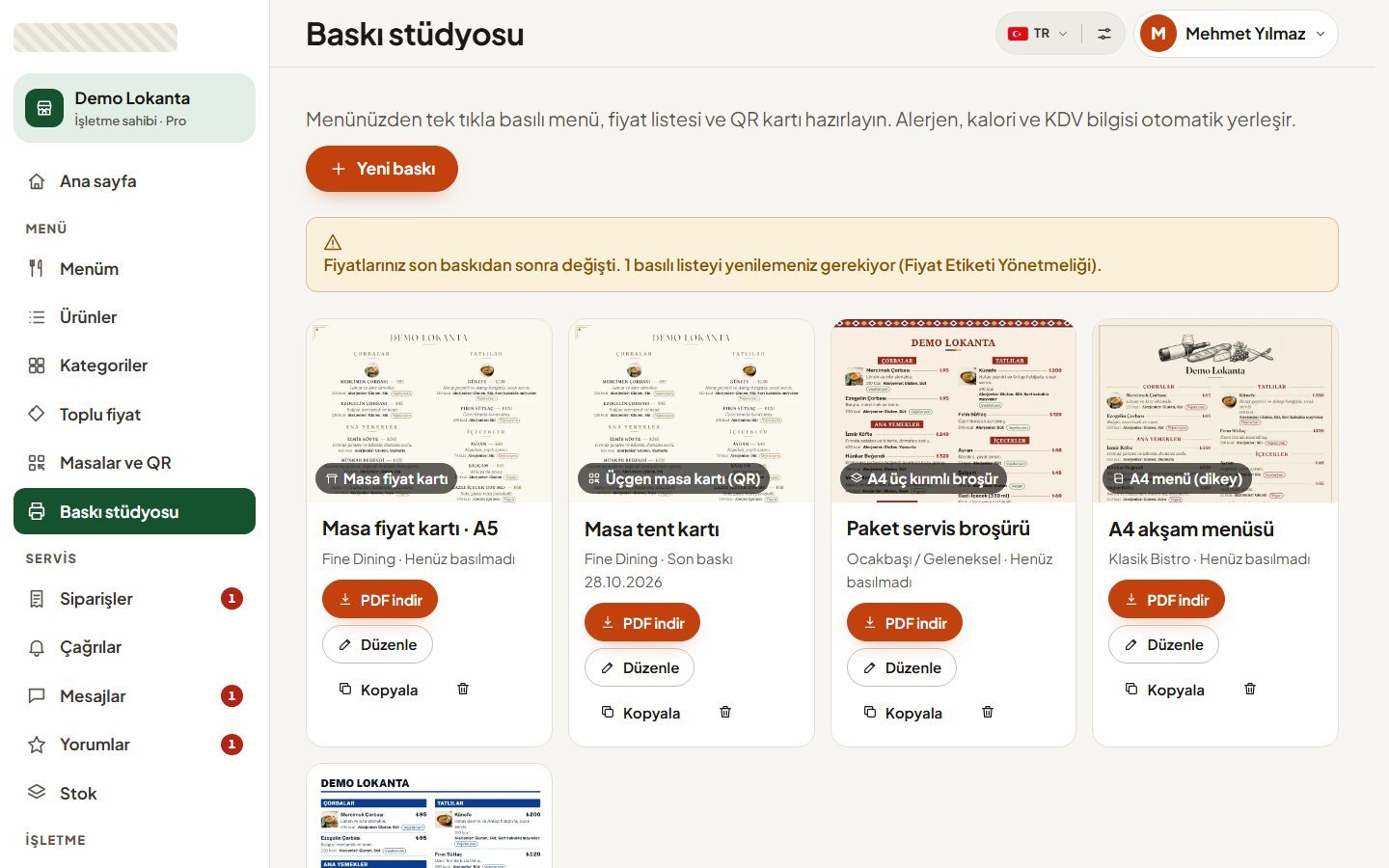
Prices changed, printed lists and the QR menu do not match.

The price changes in one place and instantly reflects on the QR menu. The panel notifies you that printed lists are outdated; bulk price increases are applied with a preview, and the last bulk increase can be undone with a single click.

We don't know how to meet the allergen and calorie requirements.

The product form requires 14 allergens, calories per portion, and ingredients in separate fields. Missing information appears in the compliance score; you can have the calories calculated from the ingredients and their weights.

Hands are raised to call the waiter, the bill arrives late.

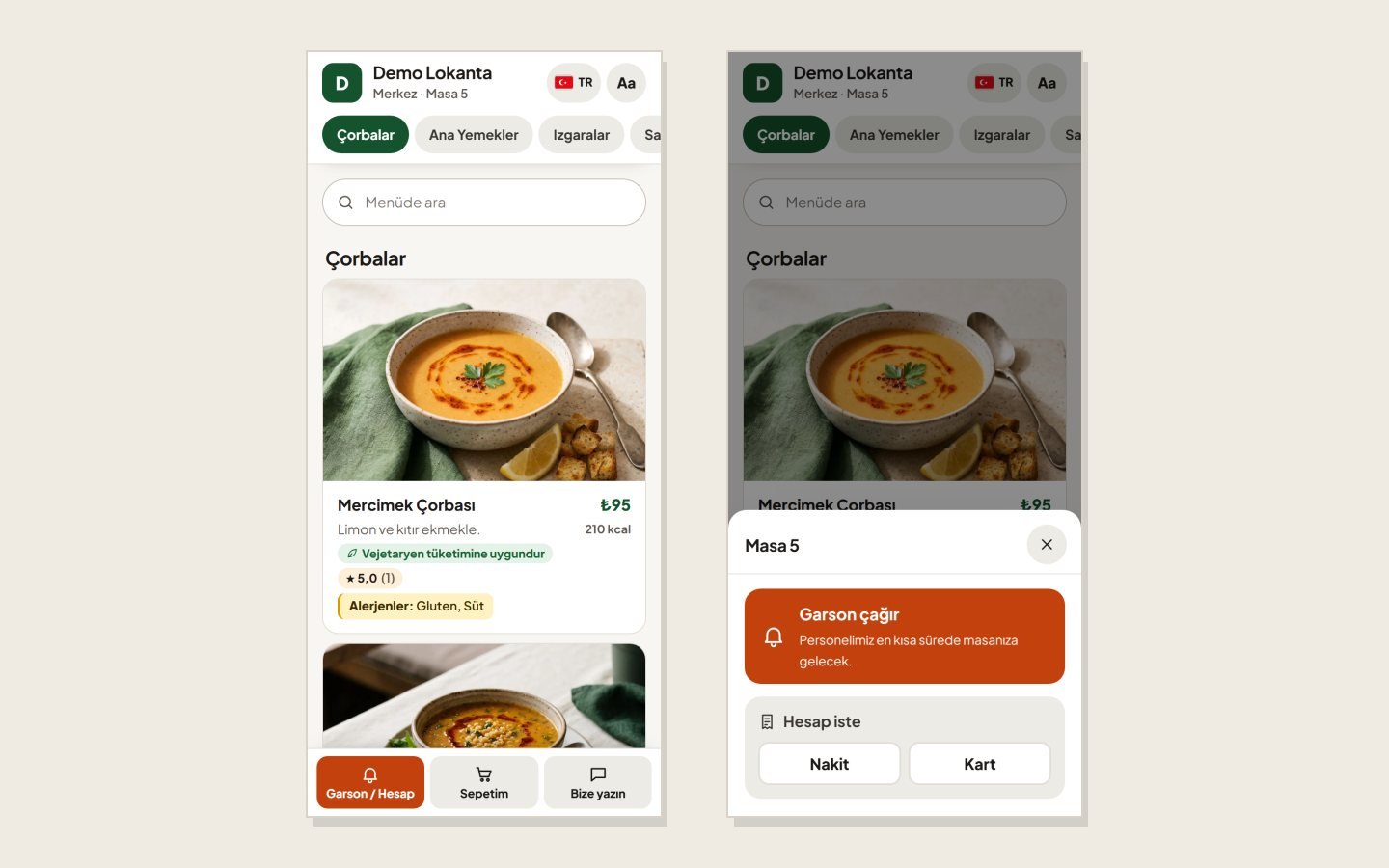
From the starter package onwards, the guest can call the waiter from the table QR or ask for the bill by selecting cash or card. When the panel is open in a tab, the request is announced with sound, vibration on supported phones, and browser notifications.

Prices are different in branches, a separate menu is kept for each branch.

The menu remains shared, while price and stock are entered per branch. The QR menu, order amount, and printouts use the same branch price; the branch manager only manages their own branch.

How it works

  1. Enter the menu

    The setup wizard recommends categories based on your business type. Products are entered with their portions, prices, calories, and allergens; images are uploaded from the phone and cropped in the browser or selected from the ready-made photo library.

  2. Fix the missing information

    The compliance score shows what is missing in which product. A warning appears if a misleading word like cheese or milk is in the name of a vegan-marked product; expressions like cover charge or service fee in the product name or description are also flagged.

  3. Prepare tables and QR codes

    Tables are added individually or in bulk, each table gets its own QR code. Even if the menu address changes, the printed code continues to work.

  4. Get the printed menu

    You choose one of the entrance price list, table card, or menu formats, along with your style. Products fit on the page automatically; if allergen or calorie info is missing, a DRAFT stamp is placed on the printout.

  5. Run the service

    Call and bill requests go to the waiter, approved orders go to the kitchen screen. The kitchen marks the order as "preparing" and "ready", and prints an 80 mm receipt.

  6. Update the price

    You apply a bulk increase to the entire menu, a category, or a branch, select the rounding, and preview the old and new prices. After approval, the panel shows which lists need to be reprinted.

Who sees what

Business owner

Manages the menu, prices, printing, and appearance. Opens branches, invites staff by selecting their role and branch.

Manager

Manages the menu, tables, printing, orders, and appearance. Cannot access staff, subscription, and business information.

Branch manager

Manages only their own branch's prices, stock, tables, and orders. Cannot change the shared menu.

Waiter

Closes call and bill requests, approves or rejects orders. Marks a product that has run out as "sold out" with a single touch.

Kitchen

Sees approved orders on the board, marks them as "preparing" and "ready". Does not see the amount on their screen or the receipt.

Guest

Sees the menu in their language without signing up, reads allergens and calories. Calls the waiter from the table, places orders, and tracks the status of their order.

Sample screens

QR Menu Software — Gallery 1QR Menu Software — Gallery 2QR Menu Software — Gallery 3

What is included

  • Price and calorie per portion; starting price and calorie range in the menu
  • Calorie and allergen calculation by weight from a 196-ingredient catalog
  • Distinction between "allergen-free" and "not entered yet"
  • 71 ready-made photos, recommendation based on product name
  • 6 menu themes, automatic contrast adjustment for brand color
  • Wi-Fi password, working hours, and branch list under the menu
  • Undeletable legal warning text on QR cards
  • Remaining days counter for the food information transition period
  • QR scan counter and statistics for the last 30 days
  • Disabling of calls and orders outside working hours
  • Tracking responses to guest messages with a code and KVKK approval
  • Approved reviews, profanity filter, and business response
  • Staff invitation valid for 7 days by selecting role and branch
  • Updating and undoing branch prices with the same rule during bulk increases
  • Physical product ordering with proof approval for boards, stands, and printed menus

Data, security and integration

Data and security

Guests do not register on the menu, no sessions or cookies are used. The table code is encrypted and signed; fake calls or orders cannot be sent by guessing the table number, and when the QR is refreshed, the old code becomes invalid. There is a rate limit on calls and orders, and bot protection on message and review forms. Each business's data is kept separate, and this separation is verified with automated tests. Personal information in messages, orders, and reviews is automatically deleted when the retention period expires.

Print studio

There are 13 formats available, including entrance board, table price card, tent card, A4, A3 and A5 menus, tri-fold brochure, booklet, under-glass menu, QR sticker, and door decal; each can be printed in one of 10 styles. Allergen and calorie lines do not go below 7 points, no style can change this. In printing press mode, a 3 mm bleed and crop marks are added; the output is downloaded from the browser as a PDF.

Packages and setup

You can start with a free package or a 14-day trial without requiring a card. As the package scales up, staff accounts, menu languages, waiter calls, reviews, and table ordering are unlocked, and the number of branches increases. In the free package, 3 print styles are available, and a small platform line is added below the print. When downgrading to a smaller package, excess products and languages are not deleted, they are hidden. For installation on your own server, a domain-specific license is provided that is verified without requiring an internet connection.


Examples of this solution

Frequently asked questions

Is the QR menu compliant with the regulations?
The 14 allergens, energy per portion, and ingredients required by the Turkish Food Codex are entered in separate fields; products containing alcohol and pork are shown with a prominent label, and the line "Prices include VAT" is located at the bottom of the menu. The system gives a warning for missing info but does not prevent you from saving the product; the business is responsible for the accuracy of the information.
Is the QR on the table enough, or is a printed list also required?
The Price Tag Regulation requires a price list at the entrance and on the table. The list on the table can also be presented via QR, but a printed list must be provided if the guest requests it. This is why the entrance board and table price card in the print studio list all products offered for service.
In which languages does the menu open?
Turkish, English, Russian, Arabic, and German. The menu opens automatically according to the phone's language, and Arabic is aligned right-to-left. Translations are entered per language in the product form; there is no automatic translation, untranslated products appear in Turkish. In the free package, the menu is only in Turkish; the number of languages increases with the package.
Do I need to reprint QR codes when the price changes?
No. The QR code points to a permanent short URL, so the code remains the same when the menu is updated. However, you do need to reprint printed lists that contain prices; the panel shows which ones are outdated.
Can the guest order from the table, and how is the payment taken?
Yes, in the higher packages, the menu opened with the table QR has a cart, and the guest tracks the order status from their phone. You decide whether the order goes through waiter approval first. There is no online payment; the guest chooses cash or card when asking for the bill, and payment is taken at the table.
Can it be installed on our own server?
Yes. Instead of a subscription, you can run the system for a single business on your own server with a license linked to your domain name. In this setup, all package features are unlocked indefinitely, but the physical product store and platform support are not included. The wizard prepares the database and the owner account.

Other solutions for similar needs

All solutions
MLM Software

MLM Software

  • Members order from their phones and follow their tree and bonuses
  • Runs on a binary plan; you set the rates, thresholds and caps
  • Month-end bonuses are finalized with your approval, then go to wallets

Who it is forNetwork marketing companiesDirect selling brandsCosmetics and personal care manufacturersDietary supplement and natural product brands

Details
Custom Ecommerce Software

Custom Ecommerce Software

  • Your team tracks payment, shipping, invoices and returns in one panel
  • Customers can order without creating an account
  • Coupon, stock and shipping rules are set up around your store

Who it is forManufacturers selling under their own brandStores with spec-heavy productsRetailers with special return and invoice rulesBusinesses moving off an off-the-shelf platform

Details
B2B Product Catalog

B2B Product Catalog

  • Buyers list products with quantities and send them in one message
  • Requests reach your team by WhatsApp, phone or form
  • Collect requests even for out-of-stock items or ones with hidden prices

Who it is forWholesale suppliersManufacturersDistributorsIndustrial materials sellers

Details