

AI University Matching Platform for College and Career Guidance
AI can state a cutoff score that doesn't exist. Here, fixed rules calculate the score, and universities and figures in replies are checked against the source.
DetailsReferences: 1

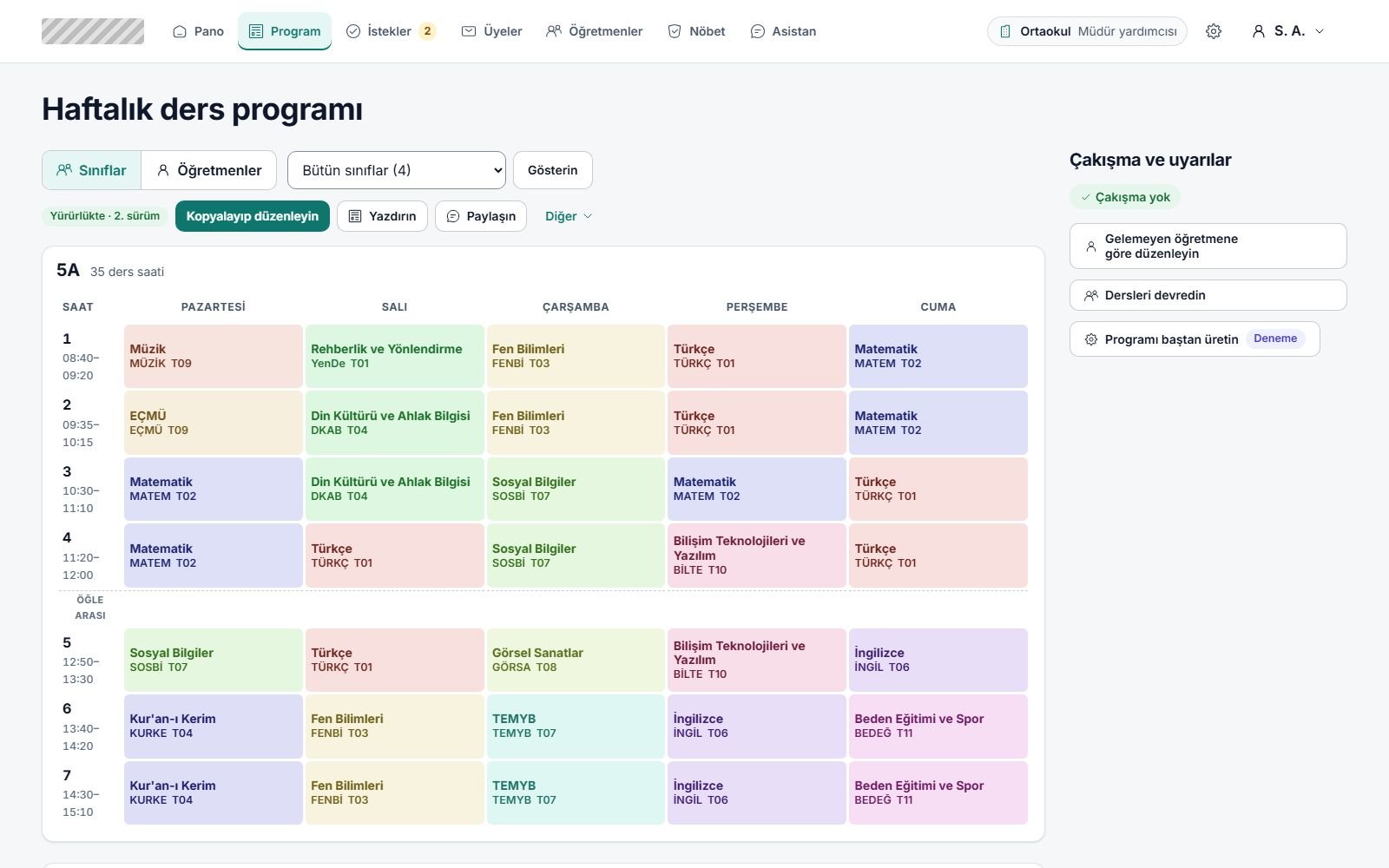
We build it for school administrators. The timetable comes from Excel or a setup wizard; teacher requests, duty, substitutes and the year rollover run on the same data, and changes are announced by link with no accounts to create.

One teacher asked for a day off and we rewrote the whole timetable.
The request is applied on top of the live timetable. The system first clears conflicts, then moves the fewest lessons possible, then respects teacher preferences; you see the difference before applying it.
Several timetables are circulating in the group chat and nobody knows which one is valid.
Every publication has an effective date, and links open the version in effect. The teacher link also shows future-dated changes in advance.
Excuses stay in phone notes, and who asked for what gets forgotten.
Teachers mark their availability on their own screen. An unavailable mark goes to an administrator for approval, a prefer-not mark takes effect at once as a preference, and no reason is asked for.
Duty and substitutes live in separate sheets and contradict the timetable.
The school duty roster is calculated from teaching days in the timetable. A teacher gets duty on a day without lessons only if no other option remains, and the administrator is warned. A time-limited substitute note shows in the timetable and calendar without changing the publication.
Paste an Excel table or upload an .xlsx file and map the columns; teachers, courses and assignments are derived from it. A school without a spreadsheet starts step by step with the setup wizard.
Lessons are moved on the grid, conflicts are flagged instantly and actions can be undone. When you get stuck, the repair-conflicts command brings you a suggestion.
Select a teacher who can't come in or is leaving, and the system prepares a change proposal. Apply it to this draft or try it in a new one.
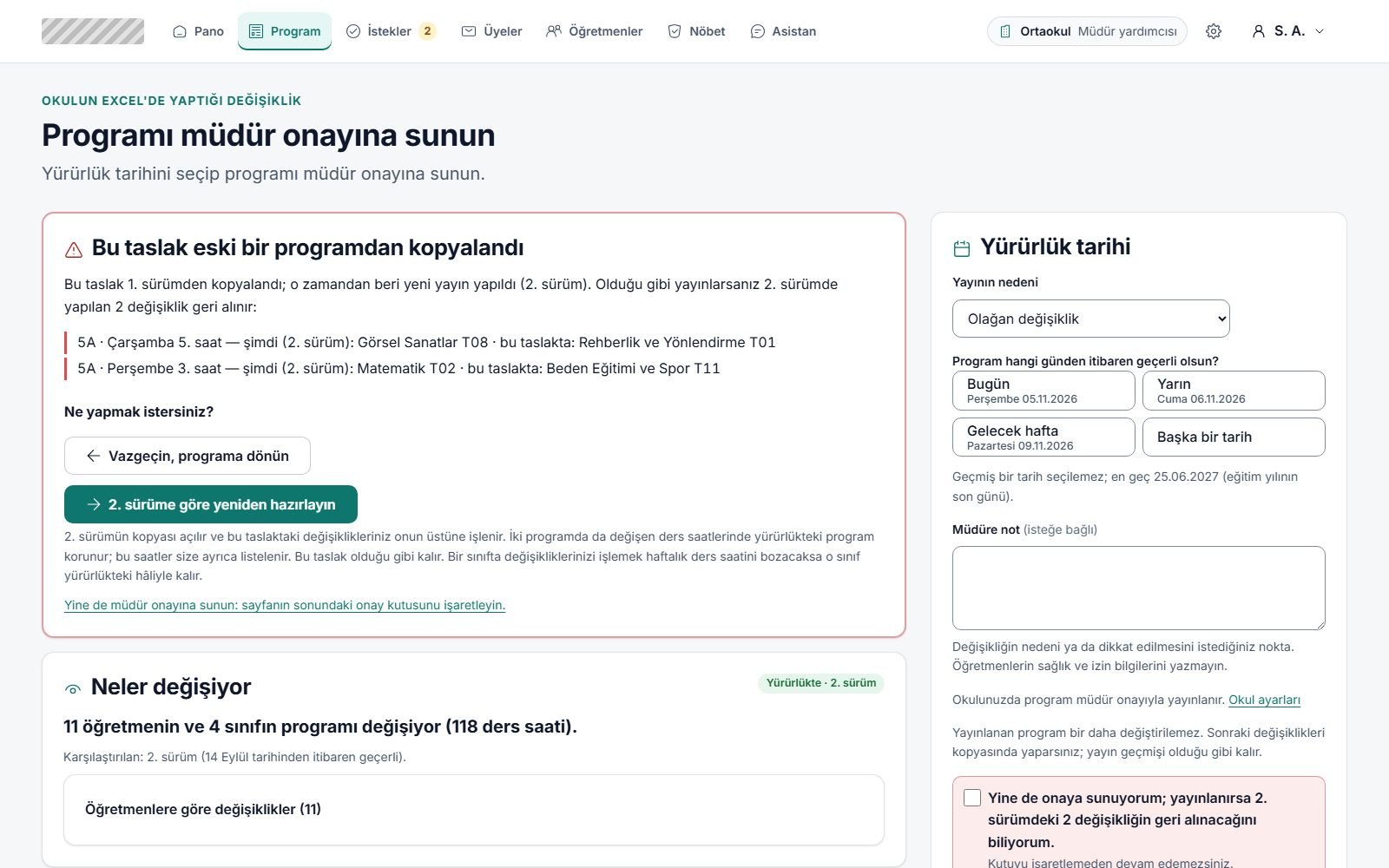
Choose an effective date; a timetable with remaining conflicts can't be published. If principal approval is on at the school, a timetable prepared by a vice principal goes to the principal first.
The system lists the teachers and lessons whose timetable changed. A notice list for signatures, a ready-made message and a list of changes to enter by hand into e-Okul (the national school information system) all come from this difference.
Classes move up a grade, and teacher and course details carry over. The previous year stays in a read-only archive, and setup doesn't start over in the new year.
Approves a publication or rejects it with a reason, and turns the approval rule on or off. Exports the school's data and takes the final step that opens the new school year.
Prepares the timetable, tries out suggestions and rules on teacher requests. Invites teachers and handles duty and substitute records.
Sees their own week on a phone and reads the change note. Marks availability and sends requests on their own behalf.
Check the weekly timetable from the class link without an account. Can subscribe in a calendar app.
Until institution verification is complete, the wizard runs with pseudonyms and real teacher names aren't entered. Teacher requests and substitute records have no reason field, so no leave or health details are asked for. The principal can export the school's data as a single file. A deletion request first asks for that file to be downloaded; at the end of a waiting period the data is destroyed and a destruction certificate is produced; order and invoice records subject to legal retention are kept separately. Backups are encrypted and can be tested with a restore drill.
The system doesn't write data to e-Okul or pull data from it. After publishing, it lists what changed by section, day and period; the administrator enters those changes by hand and marks them as entered. Extra-lesson caps and the holiday calendar don't come automatically from an official source; the administration checks them. Calendar subscriptions run on iCal, and sign-in goes through single sign-on (SSO).
All you need to migrate is the school's current timetable. The uploaded file isn't stored; an import report shows the conflicts in your spreadsheet, and the timetable opens as a draft. If your lesson distribution sheet has an unusual layout, the mapping screen may need manual guidance, so we check the first import together with your own file.
AI can state a cutoff score that doesn't exist. Here, fixed rules calculate the score, and universities and figures in replies are checked against the source.
DetailsReferences: 1
Shares get mixed up in spreadsheets, and donors call to ask for updates. Every stage is tied to a record, and donors follow it on their own screen.
Details
When the website is in one place, forms in email and receipts elsewhere, we bring them all into one panel split by team permissions.
Details